- Welcome to The International Simutrans Forum.

News:
SimuTranslator
Make Simutrans speak your language.
Make Simutrans speak your language.
Recent posts
#21
Community Discussion / Re: Re: About the Community Ma...
Last post by martin509 - October 08, 2026, 03:59:37 PMI don't think makie was talking about AI generating poorly-optimized code. Generally speaking, AI is actually pretty good at generating highly optimized code! It is good at choosing the right algorithm for a task and is good at performance optimization, and generally speaking it doesn't necessarily cause huge issues with code size or memory usage in my experience (... it causes other issues, but, hey). If anything, the fact that most human coders generally don't try to optimize most code at all gives AI code a leg up on humans.
The problem makie brought up is that, well, AI is still a kind of comical amount of resources to throw at the task. I am optimistic that the power and resource usage will come down a lot over time (it's becoming clear that the absolute top end AI models are simply overkill and that you can get a lot done with a local model on a gaming PC, for instance) but a lot of people still have ethical qualms with supporting the kind of resource use associated with big AI data centers.
As far as my opinion...
My view is that while AI is a very powerful tool and has demonstrably speeded up Simutrans development a lot, it needs to be used very carefully in a way that respects both reviewer workload and existing codebase structure, conventions, and design. In particular, there is pretty clearly a gap in testing that I think is partially the fault of contributors and partially caused by how Simutrans development previously worked.
I will use the recent work on Extended as a reference point because it's what I'm familiar with: Basically, the initial introduction of AI to Extended dev basically broke the game, in particular map generation, because in the process of solving several innocuous multithreading race conditions, the AI essentially deadlocked map gen, and addressing this resulted in the implementation of several Github unit tests to catch this kind of obvious problem before it was deployed, because there simply wasn't a need for that kind of thing before.
In a perfect world with professional maintainers who properly implement automated tests for everything before pushing to production, this is not really a problem (AI introducing code smells and potentially bad code structure still is a problem, but besides that), but Simutrans is not being developed by full-time professionals. The previous system of essentially amateur development - where the maintainers did not need professional-style testing and deployment pipelines, because the pace was slow and generally everyone trusted contributors to test their code - worked completely fine, but AI development introduces problems that mean that kind of style isn't really tenable without either hard work or, at the very least, banning lazy one-shot minimally-specified vibecoding on a "you know it when you see it" basis.
So.. I think there will need to be considerations around modernizing how the game is developed, and for explicitly holding contributors to higher standards.
The problem makie brought up is that, well, AI is still a kind of comical amount of resources to throw at the task. I am optimistic that the power and resource usage will come down a lot over time (it's becoming clear that the absolute top end AI models are simply overkill and that you can get a lot done with a local model on a gaming PC, for instance) but a lot of people still have ethical qualms with supporting the kind of resource use associated with big AI data centers.
As far as my opinion...
My view is that while AI is a very powerful tool and has demonstrably speeded up Simutrans development a lot, it needs to be used very carefully in a way that respects both reviewer workload and existing codebase structure, conventions, and design. In particular, there is pretty clearly a gap in testing that I think is partially the fault of contributors and partially caused by how Simutrans development previously worked.
I will use the recent work on Extended as a reference point because it's what I'm familiar with: Basically, the initial introduction of AI to Extended dev basically broke the game, in particular map generation, because in the process of solving several innocuous multithreading race conditions, the AI essentially deadlocked map gen, and addressing this resulted in the implementation of several Github unit tests to catch this kind of obvious problem before it was deployed, because there simply wasn't a need for that kind of thing before.
In a perfect world with professional maintainers who properly implement automated tests for everything before pushing to production, this is not really a problem (AI introducing code smells and potentially bad code structure still is a problem, but besides that), but Simutrans is not being developed by full-time professionals. The previous system of essentially amateur development - where the maintainers did not need professional-style testing and deployment pipelines, because the pace was slow and generally everyone trusted contributors to test their code - worked completely fine, but AI development introduces problems that mean that kind of style isn't really tenable without either hard work or, at the very least, banning lazy one-shot minimally-specified vibecoding on a "you know it when you see it" basis.
So.. I think there will need to be considerations around modernizing how the game is developed, and for explicitly holding contributors to higher standards.
#22
Community Discussion / Re: Re: About the Community Ma...
Last post by Mishasama - October 08, 2026, 02:49:47 PMEverything has its price; we can only weigh the pros and cons and choose the best option.
While AI generates a lot of redundant content and is poorly optimized, it still solves the pressing problem of manpower shortages. However, achieving maximum code elegance is not the most urgent issue in today's world. This is why hardware performance continues to improve.
While I also appreciate the most concise and elegant code, achieving in 1MB what AI requires 1GB, I believe that starting from scratch is the most difficult, as it determines whether anyone, and how many people, will get involved in the project.
If we strive for perfection too much, many things in this world will remain unattainable, or require enormous sacrifices. To survive better, we must learn to accept imperfections, endure hurt, and persevere. This doesn't mean giving up on our dreams, but rather understanding that these are the prices we must pay to achieve them.
I myself used to spend a lot of time reviewing other people's code and streamlining it to the smallest possible bytes. But I later found that this approach was largely ineffective and negligible to most people. Of course, in today's world, most people's devices are still capable of running less-than-optimal programs, and they care more about functionality and ease of use. Few people will worry about each instruction requiring an extra 10% performance effort. When they notice the difference, more people will choose to upgrade their hardware and spend money to solve the problem, rather than complaining about poor program optimization and demanding that the programmer optimize their code.
I believe that elegant code is our ultimate goal, but it's not something we should consider during a life-or-death situation. Especially when the main members of an open-source project don't have many resources to dedicate, it already means the project has entered a state of emergency.
I believe I now consider issues more from the perspective of an annoying project manager, rather than from the perspective of a perfectionist and respected programmer.
As for Google Translate distorting the original meaning, there seems to be nothing that can be done... If you are already proficient in the target language, you don't need to use translation, right?
The above text was translated by Google. Google is responsible for any disputes or conflicts arising from it.
While AI generates a lot of redundant content and is poorly optimized, it still solves the pressing problem of manpower shortages. However, achieving maximum code elegance is not the most urgent issue in today's world. This is why hardware performance continues to improve.
While I also appreciate the most concise and elegant code, achieving in 1MB what AI requires 1GB, I believe that starting from scratch is the most difficult, as it determines whether anyone, and how many people, will get involved in the project.
If we strive for perfection too much, many things in this world will remain unattainable, or require enormous sacrifices. To survive better, we must learn to accept imperfections, endure hurt, and persevere. This doesn't mean giving up on our dreams, but rather understanding that these are the prices we must pay to achieve them.
I myself used to spend a lot of time reviewing other people's code and streamlining it to the smallest possible bytes. But I later found that this approach was largely ineffective and negligible to most people. Of course, in today's world, most people's devices are still capable of running less-than-optimal programs, and they care more about functionality and ease of use. Few people will worry about each instruction requiring an extra 10% performance effort. When they notice the difference, more people will choose to upgrade their hardware and spend money to solve the problem, rather than complaining about poor program optimization and demanding that the programmer optimize their code.
I believe that elegant code is our ultimate goal, but it's not something we should consider during a life-or-death situation. Especially when the main members of an open-source project don't have many resources to dedicate, it already means the project has entered a state of emergency.
I believe I now consider issues more from the perspective of an annoying project manager, rather than from the perspective of a perfectionist and respected programmer.
As for Google Translate distorting the original meaning, there seems to be nothing that can be done... If you are already proficient in the target language, you don't need to use translation, right?
The above text was translated by Google. Google is responsible for any disputes or conflicts arising from it.
#23
Pak128 Bug Reports / Re: About the Translation Serv...
Last post by cekukngdjyhbcr - October 08, 2026, 12:41:30 PMI found no bugs in new game. New York map crash at changing language of name from Germany to Japanese.
#24
Web & Wiki / Re: OpenTTD on Steam cost mone...
Last post by Isaac Eiland-Hall - October 08, 2026, 08:53:55 AMI'm not sure it's particularly anything for us.
#25
Web & Wiki / Re: OpenTTD on Steam cost mone...
Last post by makie - October 08, 2026, 07:35:46 AMIs this good or bad for us?
#26
Patches & Projects / Re: Simutrans 32-bit graphics ...
Last post by makie - October 08, 2026, 06:47:05 AMFound a bug:
If you zoom out max, there are pieces of the overhead line of the railways next to it. Too big and in the wrong place.
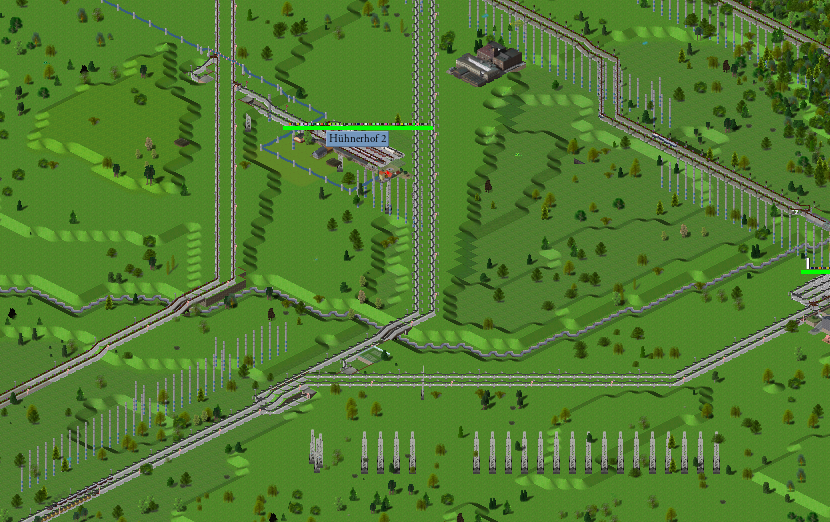
If you zoom out max, there are pieces of the overhead line of the railways next to it. Too big and in the wrong place.
#27
Community Discussion / Re: Re: About the Community Ma...
Last post by makie - October 08, 2026, 06:06:11 AMQuote from: prissi on October 07, 2026, 11:32:23 PMAll the efficiency lost to lousy software, bloated libraries and interpreters on interpreters, trying hard to burn the 40000 times increase of the bare calculation speed.
That really resonates with me.
Especially when I consider that, at my first job, I used to run the monthly payroll for 2,000 to 3,000 employees on an IBM 370/125. This involved printing payslips, calculating taxes and social security contributions, computing piecework wages and bad-weather allowances, and generating a magnetic tape of transfer data for the bank. The whole process—including printing and data backups—took just one to two hours on a machine with 80 KB of RAM and 400 MB of disk storage.
[DE]
Das spricht mir aus dem Herzen.
Vor allem wenn ich bedenke dass ich auf einer IBM 370/125 bei meiner ersten Arbeitsstelle am Monatsanfang pro Tag für 2000-3000 Mitarbeiter die Lohnabrechnung gefahren habe. Mit Lohnzettel Drucken, Steuerberechnung, Sozialversicherung, Akordlohnberchnung, Schlechtwettergeld und einem Magnetband für die Bank mit den Überweisungen. Das ganze auf einer Maschine mit 80kByte Arbeitsspeicher und 400 Megabyte Plattenspeicher hat nur 1-2 Stunden gedauert, inclusive Drucken und Datensichern.
Edit:
Google translate is treacherous. If you don't proofread it carefully, the meaning of the sentence can easily get twisted.
Korrekt translation of the first sentence is:
Especially when I consider that at my first job, I used to do payroll processing for 2000-3000 employees every day on an IBM 370/125 at the beginning of each month.
It was a small data center with just a handful of people. Between the first and roughly the 15th of every month, we ran a payroll job every day. On top of that, we handled accounting for about 100 companies and invoicing for around 10 companies—generating 5,000 invoices daily. One company alone had invoices totaling over a million DM each day.
I learned a great deal at that company—precisely because there were so few of us, which meant I had to do everything. If a program crashed during the night, I had to track down the error; otherwise, work couldn't continue.
[DE]
Es war ein kleines Rechenzentrum mit einer Handvoll Leute. Zwischen dem ersten jedes Monats und etwa dem 15. haben wir jeden Tag so einen Lohnabrechnunglauf gemacht. Daneben noch Buchhaltung für etwa 100 Firmen und Fakturierung (Rechnungen schreiben) für ca 10 Firmen mit 5000 Rechnungen jeden Tag. Eine Firma hatte jeden Tag Rechnungen für über eine Million DM.
Ich habe in dieser Firma sehr viel gelernt.
Gerade deshalb weil wir so wenige Leute waren und ich dadurch alles machen musste. In der Nacht, wenn ein Programm abstürzte, den Fehler suchen, sonst ging es nicht weiter.
#28
Community Discussion / Re: Re: About the Community Ma...
Last post by prissi - October 07, 2026, 11:32:23 PMYou never had to review code? This is not the most pleasant thing to do. Moreover, I am not fully convinced of AI for generating new code. It does generate code (and verbose documentation at times too). But it is rarely the most elegant or "best" solution.
Coding alone is not the bottleneck.
Reviewing and bug hunting is way more time consuming, as any programmer will tell you. Coding is 15%, documentation is another 15% and bug hunting is 50%. The rest is maintenance. (Although, I have failed to see AI help me with bug hunting. But then, I never invested much time in learning this.)
AI certainly has its problems. For coding, it should be possible to train an ethical AI on open source code only. But it would not understand simple instructions, as it needs to get that context from manuals and other stolen literature. And it is not just the stolen content.
Generally, I am with Roboron in a broad sense. Current IT wastes already bits by the billion and trillion (literally), and AI takes this another billion higher. Honestly, 100 GB in weight to produce a sentence of text? (Considering that wikipedia is less than 27 GB in size without images ... ) This cannot be the final answer. But sustainable IT is something every tech giant strongly avoids to ever mention, out of fear of not being able to deliver. (Just thinking that my Atari ST in 1992, where I wrote my PhD thesis, had 1 MB of RAM running at 8 MHz, and the TurboC IDE and word processor was not my lacking 12000 times in comparison to the 12 GB requiring office 365 and MSVC. Or my Palm from 2000 with 2 MB and running a month on two AA batteries and current phones barely running for a day with 2GB. All the efficiency lost to lousy software, bloated libraries and interpreters on interpreters, trying hard to burn the 40000 times increase of the bare calculation speed.
Coding alone is not the bottleneck.
Reviewing and bug hunting is way more time consuming, as any programmer will tell you. Coding is 15%, documentation is another 15% and bug hunting is 50%. The rest is maintenance. (Although, I have failed to see AI help me with bug hunting. But then, I never invested much time in learning this.)
AI certainly has its problems. For coding, it should be possible to train an ethical AI on open source code only. But it would not understand simple instructions, as it needs to get that context from manuals and other stolen literature. And it is not just the stolen content.
Generally, I am with Roboron in a broad sense. Current IT wastes already bits by the billion and trillion (literally), and AI takes this another billion higher. Honestly, 100 GB in weight to produce a sentence of text? (Considering that wikipedia is less than 27 GB in size without images ... ) This cannot be the final answer. But sustainable IT is something every tech giant strongly avoids to ever mention, out of fear of not being able to deliver. (Just thinking that my Atari ST in 1992, where I wrote my PhD thesis, had 1 MB of RAM running at 8 MHz, and the TurboC IDE and word processor was not my lacking 12000 times in comparison to the 12 GB requiring office 365 and MSVC. Or my Palm from 2000 with 2 MB and running a month on two AA batteries and current phones barely running for a day with 2GB. All the efficiency lost to lousy software, bloated libraries and interpreters on interpreters, trying hard to burn the 40000 times increase of the bare calculation speed.
#29
Community Discussion / Re: Re: About the Community Ma...
Last post by Mishasama - October 07, 2026, 09:01:04 PMHere's what I'm thinking: since the investment in AI makes it difficult for humans to keep up, why not let AI handle the workload it brings?
Perhaps we could adopt a structure similar to traditional publishing houses, where AI acts as editors and humans handle the review and approval process. This should significantly reduce the time required for creation while maintaining a certain level of content quality.
As for ethical considerations, I don't think this harms open-source projects. After all, AI's knowledge comes from the "unpaid" contributions of humans, and then the AI's content benefits humans unpaidly. I think this is not much different from real people participating; rather, it can be understood as AI allowing more people to participate in open-source public welfare activities in another form without having to pay any additional price.
Perhaps we could adopt a structure similar to traditional publishing houses, where AI acts as editors and humans handle the review and approval process. This should significantly reduce the time required for creation while maintaining a certain level of content quality.
As for ethical considerations, I don't think this harms open-source projects. After all, AI's knowledge comes from the "unpaid" contributions of humans, and then the AI's content benefits humans unpaidly. I think this is not much different from real people participating; rather, it can be understood as AI allowing more people to participate in open-source public welfare activities in another form without having to pay any additional price.
#30
Pak128.Britain-Ex / Re: [ex-15] Recalibrating indu...
Last post by martin509 - October 07, 2026, 07:39:29 PMAnother update on this grind: I have realized this is too complex and interconnected to both accomplish and review without some massive spreadsheet that lets me redo calculations easily, so my next goal is to get exactly that put together, with common reference points, assumptions and hard data. Once this is done I'll be able to get a real PR together.
Unrelated to ALL of this, I have also put a tiny tiny PR up for Pak128-Ex that adjusts the costs of various bus stops to not be prohibitively expensive.
Unrelated to ALL of this, I have also put a tiny tiny PR up for Pak128-Ex that adjusts the costs of various bus stops to not be prohibitively expensive.